

Real-Time Integration: Unlocking Salesforce Platform Events
Modern businesses are more connected than ever. Customer Relationship Management (CRM) systems, such as Salesforce, are no longer standalone solutions—they're at the heart of complex, ever-evolving application landscapes. From marketing automation tools to order processing systems and external databases, everything needs to talk to everything.
But how do you manage this growing complexity without breaking your architecture or overwhelming your API limits?
Salesforce Platform Events provide an elegant answer. Built to support event-driven architecture, Platform Events enable Salesforce to broadcast changes as they occur, both internally and externally, without the need for constant polling or complicated, brittle integrations.

So, what is the problem?
In traditional Salesforce integrations, every connected system must constantly check (or “poll”) Salesforce to see if anything has changed. This leads to a number of common pain points:
-
API limits get consumed rapidly by repeated requests asking, “Has anything changed?”
-
Response times suffer, especially when systems must coordinate synchronously.
-
Spaghetti architectures emerge when each integration is custom-built and dependent on others.
-
Resilience drops: if one system fails, others waiting for data can get stuck or throw errors.
Imagine managing dozens of integrations this way, it’s inefficient and hard to maintain. What if, instead of every external system constantly asking Salesforce if something’s changed, Salesforce simply told them when it did?
That’s precisely what Platform Events offer.
What are Salesforce Platform Events?
Platform Events are Salesforce’s answer to asynchronous, scalable communication.
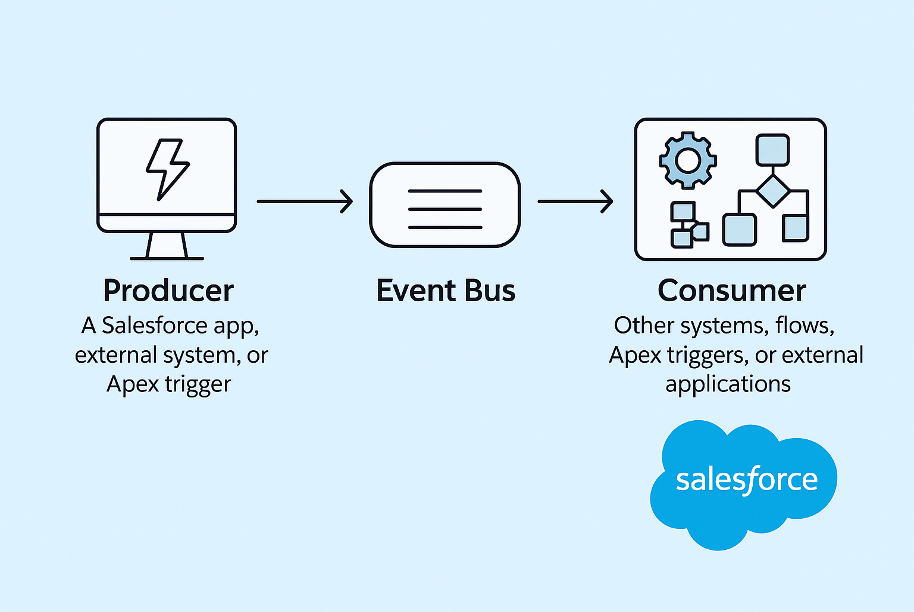
Here’s a breakdown of how they work:
-
Producer: A Salesforce app, external system, or Apex trigger detects a change and publishes an event.
-
Event Bus: Salesforce’s message queue that temporarily holds the event in strict order.
-
Consumer: Other systems, flows, Apex triggers, or external applications subscribe to the event and act once it’s received.
This is the publish-subscribe (pub/sub) model in action. Instead of one-to-one integrations (request-response), you broadcast once and let interested systems take action independently.
To use an analogy: The Delivery Hub Analogy
Imagine a busy delivery warehouse (Salesforce). Multiple delivery trucks (external systems) want to know when a package is ready for them. Without a notification system, each truck driver has to constantly walk into the warehouse and ask:
“Is my package ready yet?”
Now, picture this happening all day long with dozens of drivers. It slows down the warehouse, wastes everyone’s time, and increases the chances of missed deliveries.
Now, enter the Platform Events model.
Instead of all that back-and-forth, the warehouse sets up a digital display board (the Event Bus). When a package is ready for a specific route, the system broadcasts a message:
“Package for Route A is ready.”
Each truck is subscribed to the board and only reacts when the message is relevant to it. No interruptions. No wasted time. The warehouse operates smoothly, and deliveries occur more quickly.
Tips & Tricks for Using Platform Events
Here’s how to get the most out of Platform Events:
1. Use High-Volume Events if Needed
Standard Platform Events have volume limits. If your architecture needs to push hundreds of thousands of events daily, opt for High-Volume Platform Events (HVPE) to scale reliably.
2. Replay IDs Are Your Friend
When subscribing externally (e.g., via CometD), store Replay IDs to resume event streaming without missing messages during a disconnect.
3. Think Modular
Design loosely coupled consumers. Don’t make assumptions about the event’s origin or how fast it arrives. This ensures subscribers stay independent and reusable.
4. Monitor & Log Delivery
Use tools like Event Monitoring or custom logging frameworks to trace failed deliveries, retries, or bottlenecks.
5. Combine Declarative + Programmatic Tools
Flows can now both publish and subscribe to Platform Events. But Apex remains essential for complex logic or handling edge cases. Use both wisely.
Is there a solution?
Yes, and more than one. Platform Events can serve as the backbone of modern, event-driven architectures in Salesforce. Whether you're integrating Salesforce with external APIs, orchestrating microservices, or designing scalable business automation, Platform Events help make those systems loosely coupled and resilient.