

Designing Reliable Salesforce Integrations
Error handling, logging, retries, and idempotency: what separates an integration that works in a demo from one that works in production. An integration that works when everything goes right is easy to build. One that survives timeouts, duplicate messages, and half-finished transactions takes deliberate design. Here are five practices we rely on.
1. Handle errors by type
External systems go down, respond slowly, and send data you didn't expect. Treat those cases differently:
-
Transient failures (timeouts, HTTP 429, 5xx): retry, with limits.
-
Permanent failures (400, 401, 404, or a payload that fails validation): retrying only adds noise, so log them and alert.
-
Platform limits shape the design: 100 callouts per transaction, 120 seconds of cumulative callout time, and a default 10-second timeout per callout.
One restriction catches many teams: if you perform DML and then make a callout in the same transaction, Apex throws a CalloutException (uncommitted work pending). Make the callout first, or move it into a Queueable that runs after the commit.
2. Log in a way that survives rollbacks
Capture a correlation ID, endpoint, status code, timestamp, and error message, and never log secrets or personal data. A log record inserted with DML rolls back along with a failed transaction, so publish a Platform Event with the Publish Immediately behavior instead.

Debug logs are temporary, so they are not a production monitoring tool. Use a custom log object or an event-based approach, and alert someone when failures accumulate.
3. Retry with limits
Apex can't sleep, so retries are built from platform tools:
-
Queueable chaining with a growing delay: System.enqueueJob accepts 0 to 10 minutes.
-
Platform Event triggers can throw EventBus.RetryableException, which asks the platform to redeliver the batch later, up to a limit.
-
Scheduled or Batch Apex can periodically pick up records flagged as failed.
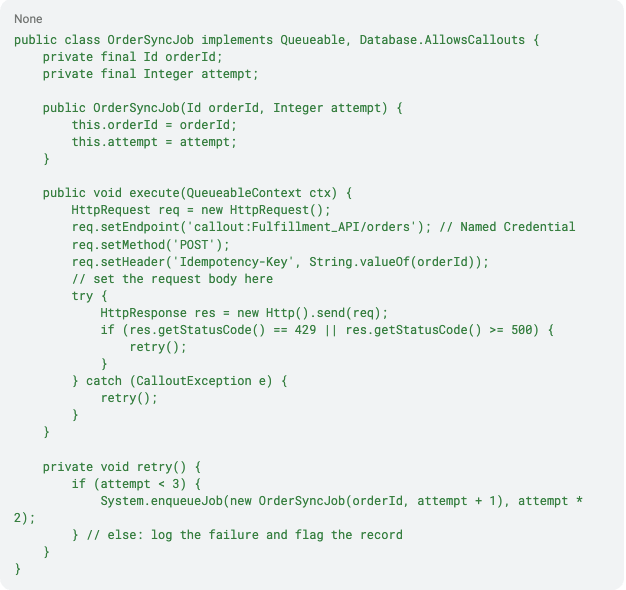
4. Make every operation safe to repeat
Retries and redelivered events mean the same request can arrive twice. Inbound, use an External ID field with upsert so the same key always resolves to the same record. Outbound, send an idempotency key, as above, if the target API supports it.

5. Pick the pattern before the technology
Start from the shape of the interaction rather than "REST or SOAP?". Salesforce's integration patterns are a useful guide:
| Pattern | Typical use | Common mechanisms |
| Request and reply | Salesforce needs an answer now | Apex callout, External Services in Flow |
| Fire and forget | Notify another system, no immediate response | Platform Events, Outbound Messages |
| Batch synchronization | Large volumes, scheduled loads | Bulk API 2.0, Batch Apex, MuleSoft |
| Remote call-in | An external system writes to Salesforce | REST or SOAP API, Apex REST |
| React to data changes | Other systems follow Salesforce changes | Change Data Capture, Pub/Sub API |
Volume, latency, and ownership of the source of truth should drive the choice. Decide early which system wins when records conflict, and how to handle events that arrive out of order.
Don't forget authentication and limits
Use Named Credentials and External Credentials rather than hardcoding endpoints or secrets in Apex. Bulkify your callouts and watch daily API request limits: an integration that is fine at 100 records can fail at 100,000.
Final Thoughts
Classify errors, log so failures survive rollbacks, retry with limits, make operations repeatable, and choose the pattern first. Build these in from the start and the integration will be far easier to maintain and scale.